Everything Flowr does.Sized to what you run.

Every plan runs a whole project, from the business case through planning, budget, risks and reporting to closure. The larger plans add what larger organisations need: more people, more projects, and governance across them.

50capabilities
31on every plan

Project delivery

The spine, and it is on every plan. Solo gives one person up to five projects, each with the whole lifecycle, because that is not the thing we hold back.
Business caseRationale, expected benefits and decision basis, snapshotted so you can compare what you promised to what you delivered.All plans
Stages and gatesDelivery split into controlled stages with approval points, from an organisation template.All plans
Plan, tasks and dependenciesGantt planning with ownership, links and drag-to-reorder.A delay on a link is not scheduled: “start three days after this finishes” starts immediately after it finishes.All plans
BaselinesThe plan you will be measured against, kept so the comparison stays honest.All plans
Project milestonesDates, ownership and status, referenced directly from the status report.All plans
Risks and issuesRegisters with impact, likelihood, ownership and escalation.All plans
Status reports (PSR)Assembled from live project data. Editable by the PM, readable by the organisation.All plans
PSR export to PDFA print-ready A4 document with RAG colours preserved, not a screenshot of the screen.All plans
Project control assistantYour thresholds applied to the project record — rules, not a language model. It shows the evidence behind each signal, so the conversation starts at what to do rather than whether it is right.All plans
Roles and responsibilitiesFifteen PRINCE2 and PMI roles ship ready to assign, from Executive and Senior Supplier to Project Assurance. Add your own if your organisation names them differently.All plans
Lessons and closureGoverned checklist, sign-off, handover, and a lessons library the next project can read.All plans
Project audit historyWho changed what, per project. Organisation-wide search is separate.All plans
Import and data exportProjects, risks and issues in from CSV or Excel, with a preview. Full organisation export out, in JSON.All plans
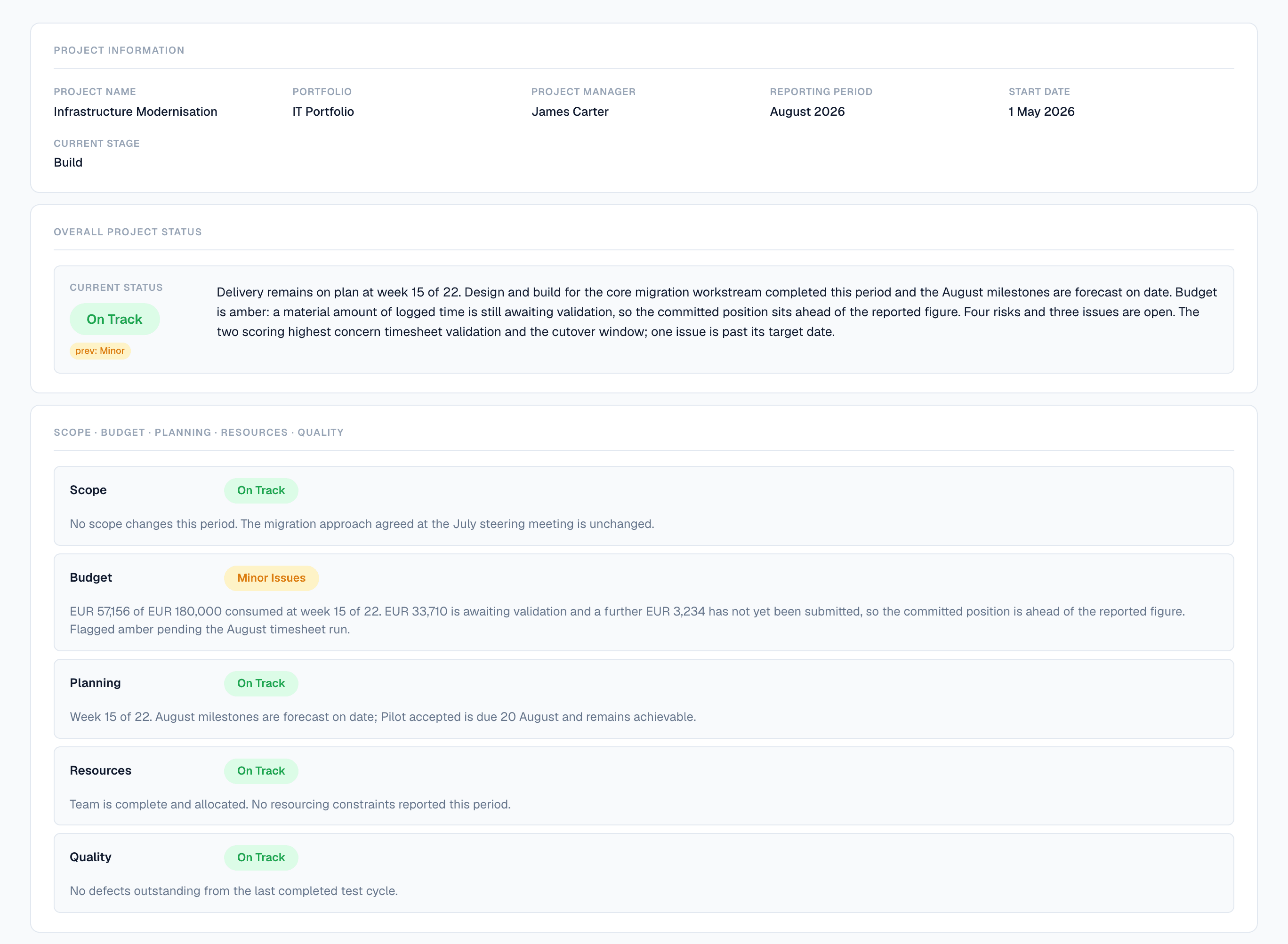
A status report as the project team submitted it. The chip under the status is the previous period, so a project quietly slipping from amber to green to amber cannot do it unnoticed.
A submitted Flowr status report for Infrastructure Modernisation, August 2026. Overall status On Track, with a chip showing the previous period was Minor. The narrative states the project is at week 15 of 22 and that the forecast is 4.5 percent over the approved budget, inside the 5 percent tolerance, after supplier work authorised at the Build gate. Separate ratings follow for Scope, Budget, Planning, Resources and Quality; Budget is amber, and its paragraph reports 145,971 euros incurred of 192,000 approved, a forecast of 200,651 at completion, 28,492 awaiting validation, and a variance of 20,603 against the cost baseline.

Financial control

Reconstructible figures. Every labour cost traces to recorded time, the rate in force on that date, and a period closed on a specific day.
Budget and forecastApproved, labour and non-labour, with variance computed server-side.All plans
Resource ratesDate-effective. A rate change next month does not rewrite what last month cost.All plans
Actual cost, ETC and EACSubmitted time counts as actual cost. Approving marks it validated and never changes the total.All plans
Time phasingThe forecast spread across periods rather than collapsed to one number.All plans
Uncosted exposureWork Flowr cannot cost is reported as exposure, never priced at zero.All plans
Forecast adjustments and EAC overrideskept · removableOverride the model and it is stored as a decision with a reason, never a silent edit.Business
Reporting periods and formal closekept on downgradeOpen, close and reopen, with the reopening recorded. Closed periods are frozen.Team
Portfolio budget roll-upPortfolio and programme totals from live project data. Each project's own figures stay open on every plan.Team
Project currenciesEach project carries its own currency, and a portfolio spanning several is reported one currency at a time.Flowr never converts between them — there is no exchange-rate engine.All plans
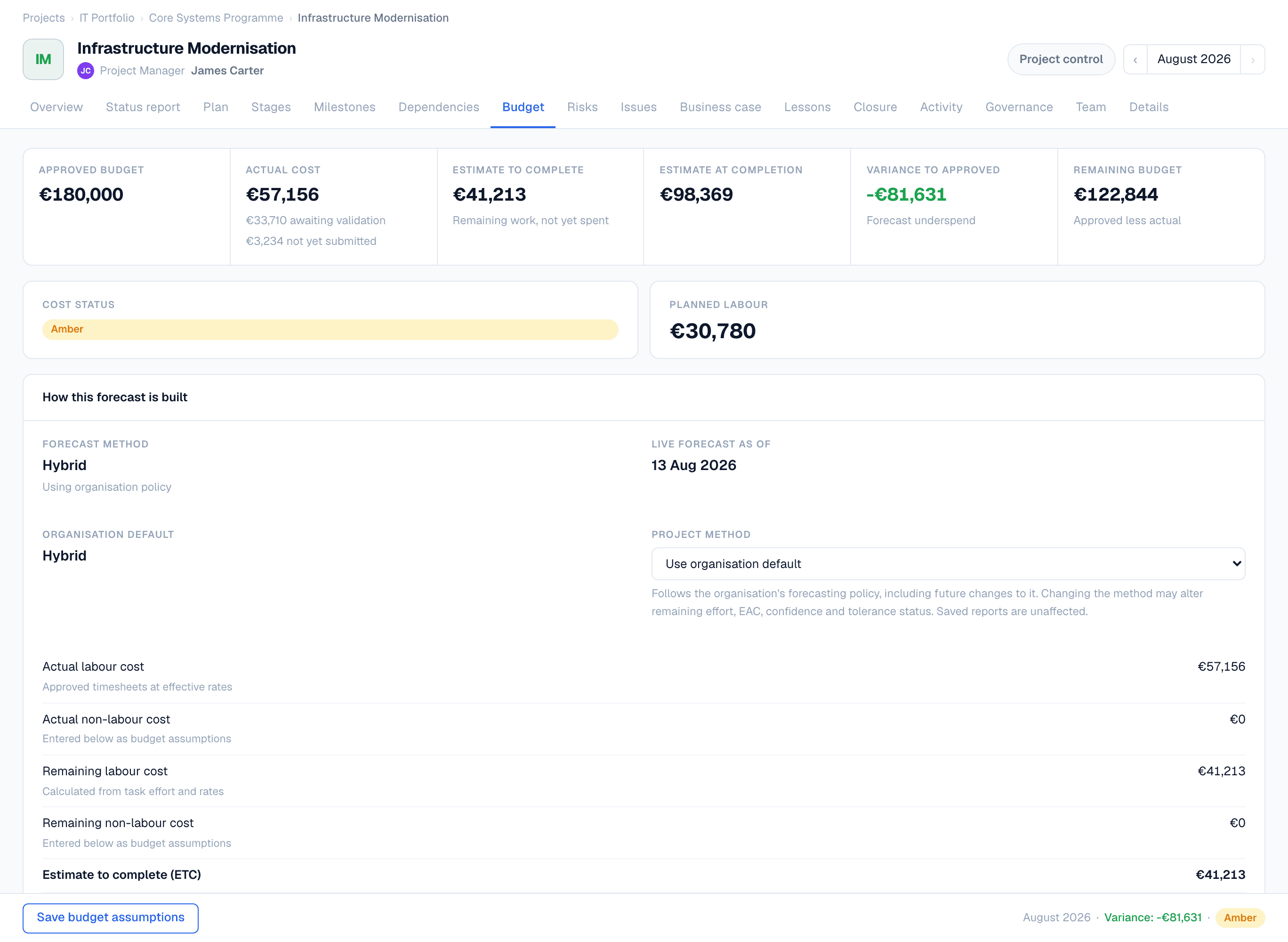
Two variances, not one: against the approved budget and against the baseline plan. Underneath, the approved budget’s own history: who authorised each change, when, and against which reference.
Flowr's budget page showing approved budget 192,000 euros, actual cost 145,971, estimate to complete 54,680 and estimate at completion 200,651, with two variances beside them: plus 8,651 against the approved budget and plus 20,603 against the baseline plan. Budget status is green, inside the 5 percent tolerance.

People and time

Time is the input to cost, so it is treated as a financial record rather than a convenience.

Timesheet entry and submissionWeekly, per task. Submitting locks the week, and counts as actual cost.All plans
Self-service time offRecord your own leave. Never gated.All plans
Invite team membersBring colleagues into the organisation. The seat limit is enforced separately.Starter
Shared project collaborationMore than one person on a project, with per-project roles.Starter
Timesheet approvalsPending queue, approve, reject. Approval marks time validated; it does not decide whether the work happened.Team
Time-off approval routingremovable on downgradeThe managerial workflow. Recording your own leave stays open on every plan.Team
Line managers and holidaysWho approves whom, and organisation calendars that reduce available capacity.All plans
Resource capacityWhere workload is building, with approved leave and holidays already removed.Business

Governance

Decide control once, at organisation level, and Flowr applies it everywhere without anyone having to remember.
Delivery signalEffort consumed against progress reported. Advisory: it raises the question, your PM answers it.All plans
Control issuesAcknowledge with a recorded reason, assign to a person, clear when resolved.All plans
Tolerance rules and alertsHow much overrun and slippage before green stops being green, applied to every project.Business
Organisation-wide control centreWhat needs attention across the organisation. The per-project assistant stays open on every plan.Business
Business reviewskept on downgradeAssemble, publish, and it becomes the version of record. One published at a time, enforced by the database.Business
NotificationsGovernance events raised in the app.There are no email notifications.All plans
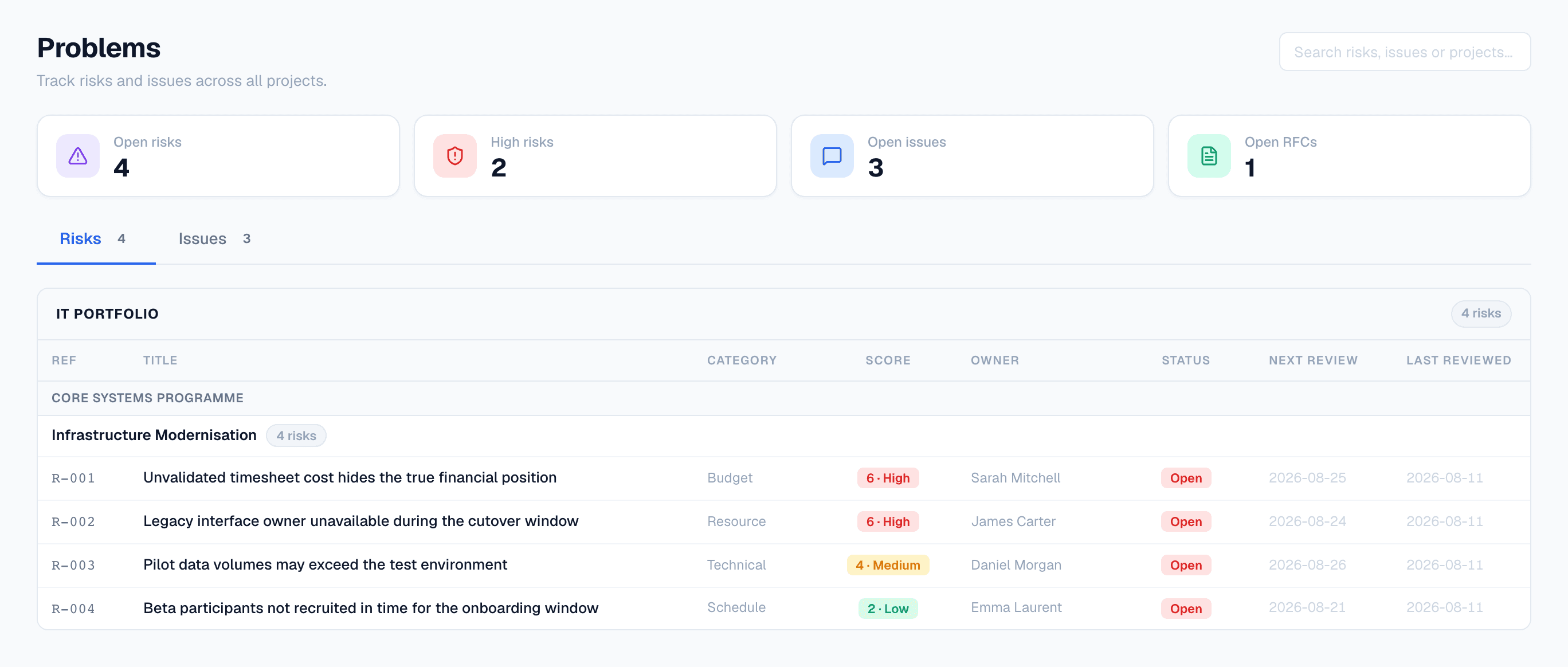
Every risk and issue in the organisation on one page, scored on the threshold you set. Grouped by portfolio and programme, because that is how they get escalated.
Flowr's organisation-wide Problems page. Counters show four open risks, two high risks, three open issues and one open request for change. The register lists four risks grouped under IT Portfolio and Core Systems Programme, each with a category, a score badge from six High down to two Low, an owner, an Open status and review dates.

Portfolio and programme

Structure above the project, and the roll-ups that come with it.
Portfolios and programmesModel delivery above the individual project. Never gated, because the structure is not the product.All plans
Portfolio timelineEvery project on one timeline.Team
Cross-project milestonesWhat is late, next and critical across projects. Milestones inside a project are not gated.Team
Role-aware dashboardAdmins see the organisation, portfolio managers their portfolio, PMs their projects. A role behaviour, not a plan boundary.All plans
Lessons libraryLessons from every project, searchable across the organisation.All plans
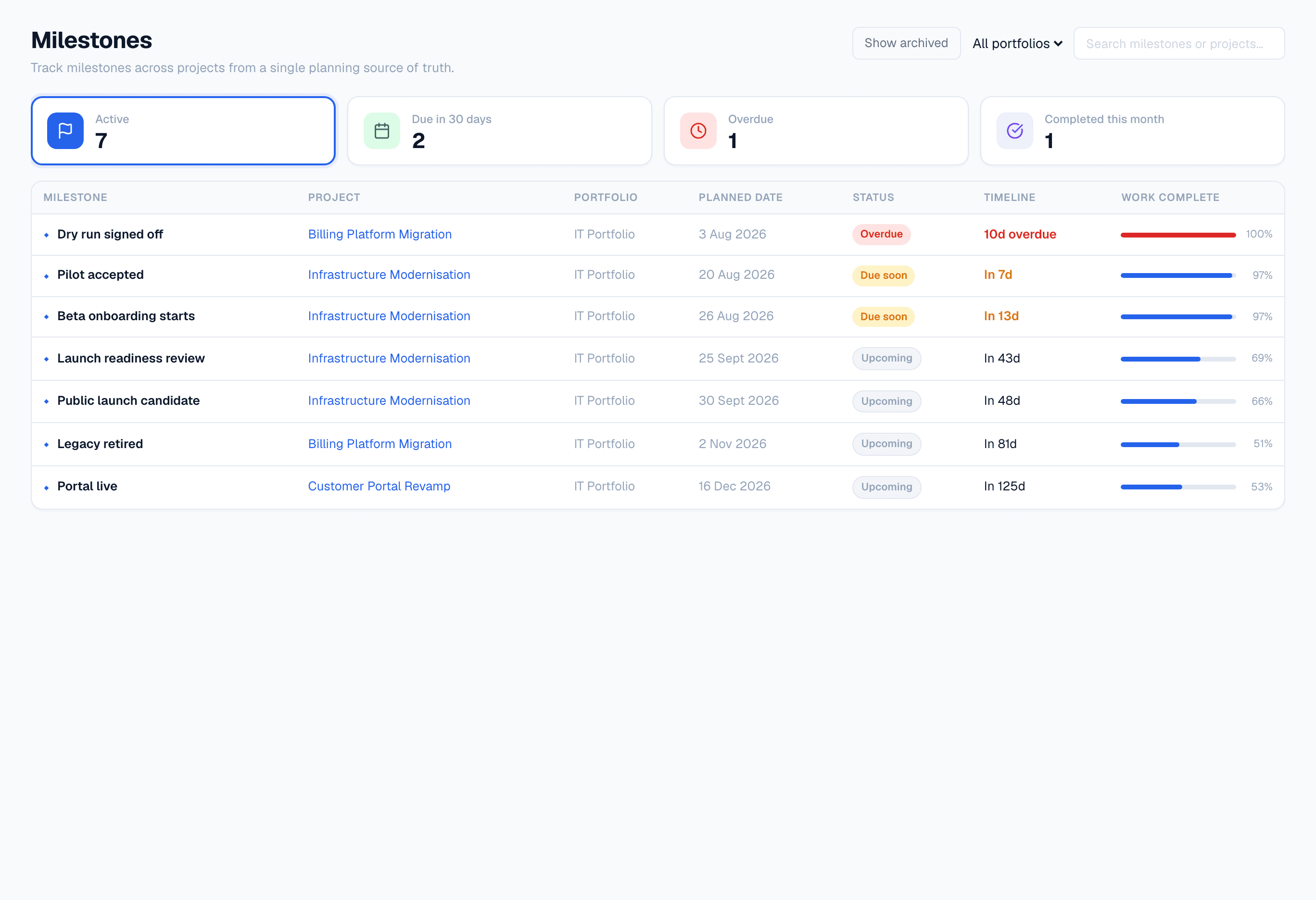
Milestones across every project, each with how much of the work due before it is actually done.
Flowr's cross-project milestone list, showing seven active milestones with their project, portfolio, planned date, status, timeline and a Work complete bar. One row is ten days overdue with all of its work complete.

Platform and administration

The parts that decide whether your organisation can actually run this.

Role-based accessOrganisation-level data separation with permission levels per role.All plans
Access that ends when you say it doesRemove someone and the next thing they try is refused — not at the end of a session, and not on the next sync. Changes from your identity provider are verified as genuine before Flowr acts on them.All plans
Accounts that match your directoryFlowr finds the accounts that no longer agree with your identity provider — the leaver still holding a seat, the renamed account — and shows you the fix before it applies it.All plans
Organisation-wide audit workspaceOne question asked of every project at once. The records themselves stay reachable on every plan.Scale
Filtered audit exportCSV or JSON, administrator only.Scale
Bulk people administrationInvite, deactivate, reactivate and reassign for many people in one previewed operation.Scale
Project AIPSR drafting, improvement and review. Draft-only, always reviewed before use.Business
Portfolio AIkept on downgradeExecutive digest across the portfolio.Scale
Organisation AI controlFlowr Assist starts off on every plan, and stays off until an administrator turns it on for the whole organisation. While it is off the server refuses every AI request and no project data is sent — including on your own provider key. An administrator also chooses the provider and model, or supplies your organisation's key, in which case you pay that provider directly.The AI settings are part of the plans that include AI.Business

Your records outlive your plan.

The rule, written into the product rather than the terms of service:

A plan may prevent creating, regenerating, changing or publishing a gated artefact. It must not prevent you from reading historical content you created while you were entitled to create it.

Readable on any plan

Closed periods and their snapshots, business reviews whether draft or published, and any portfolio digest you generated. Downgrade and you stop making new ones. You never stop reading the old ones.

Removable, always

An EAC override keeps moving your reported figure. A routed leave request keeps blocking the person who made it. Anything that carries on acting after your plan lapses can still be removed without paying again. Being able to see it but not clear it is worse than never having had it.

See it against your own projects.

Tell us what you run and we will show you what Flowr would do with it.

Flowr features — project control, portfolio, budget and reporting