Every project says it’s on track.Flowr tells you which ones are.

Business case, plan, budget and timesheets in one control system — so status comes from evidence, not from optimism.

Limited access — teams are invited progressively.

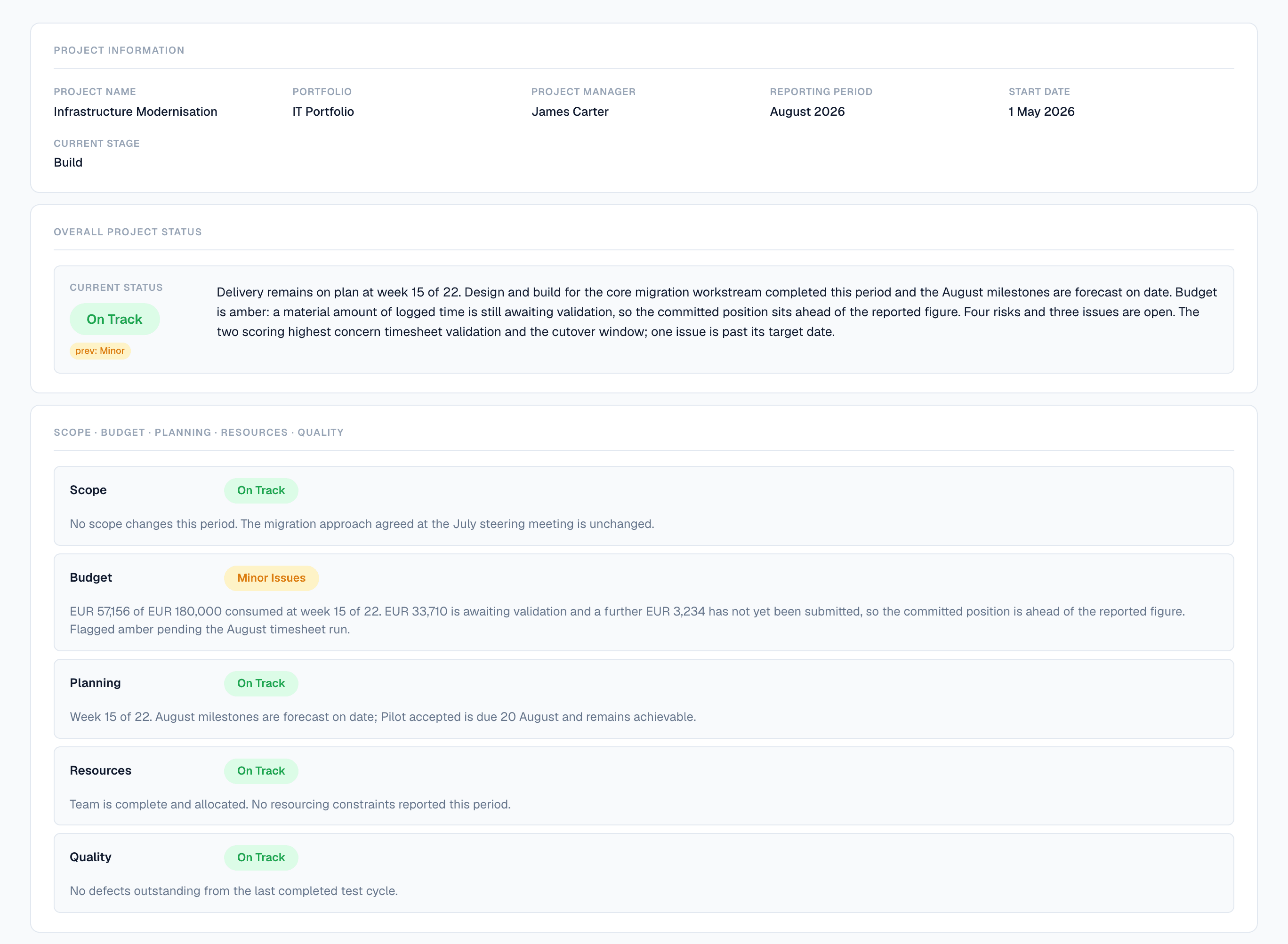
A submitted Flowr status report for Infrastructure Modernisation, August 2026. Overall status On Track, with a chip showing the previous period was Minor. The narrative states the project is at week 15 of 22, that budget is amber because a material amount of logged time is awaiting validation, and that four risks and three issues are open. Separate ratings follow for Scope, Budget, Planning, Resources and Quality.
Submitted by the project team, and candid about itself: an amber budget, four open risks, one issue past its date. It still concludes that delivery is on plan — because that part is a judgement, not a measurement. Flowr makes the measurement too.

You already know the reporting is fiction.

Not because anyone is lying. By the time a report is wrong enough to notice, the money is spent.

Today
Status typed from memory, once a week
Every manager reports amber differently
Overspend surfaces at month-end
Last quarter rebuilt from a spreadsheet
In Flowr
Status assembled from plan, budget and time
One threshold, applied to every project
Effort compared to progress, continuously
Closed periods frozen, not re-derived

A project doesn’t go off track in one week. It goes quietly.

Flowr watches the gap between what a project reports and what its own data says.

How the delivery signal works
Progress reportedEffort consumed
0%25%50%75%100%wk 1wk 5wk 10wk 1530 points apart by week 1066%94%

A diagram, not a screen. Flowr makes this comparison continuously and tells you which side of your threshold a project has landed on — it does not draw the curve.

  • Delivery signal

    A task can be 60% finished and have used 90% of its hours. Flowr notices, and tells you which tasks. What you do about it is your call.

  • Actuals from recorded time

    Time counts as cost as soon as someone logs it. You are not waiting on an approval queue to find out what a project has spent. Approving it later records who checked — the number does not change.

  • Nothing clears itself

    When Flowr flags something, you either say why it is fine or you fix it. Either way your answer is on the record, and the flag stays until you give one.

  • Explained, not just flagged

    Every flag comes with the numbers behind it: which task, how many hours, how big the gap. You can check it yourself before you act on it.

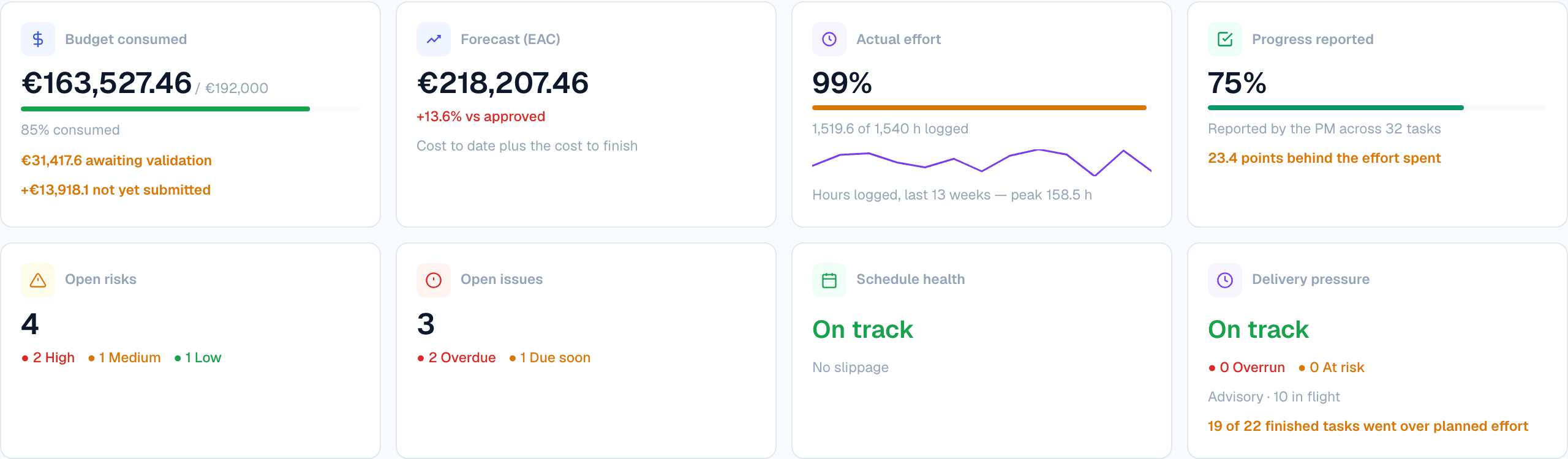
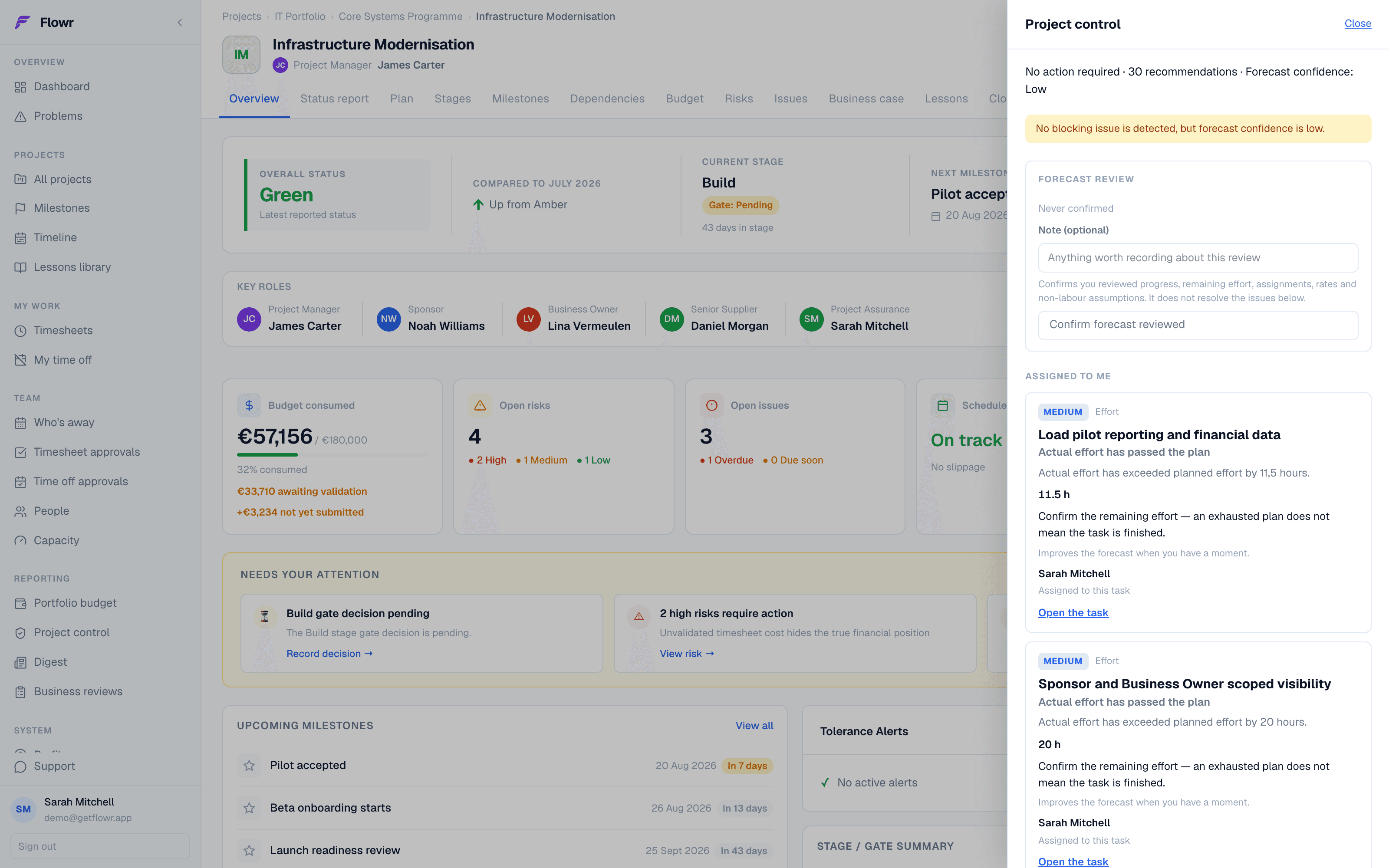
A Flowr project overview with the control drawer open. The drawer lists thirty recommendations and two effort findings assigned to the reader, each with the hours by which actual effort has passed the plan. Behind it the project shows four open risks — two high — and three open issues, one overdue.
Flowr identifies the problem, explains what led to it, and links directly to the task, budget line or reporting period it came from.

Decide once what off track means.

Set the rule at organisation level. Flowr applies it to everything, without anyone having to remember.

Budget variance tolerance · organisation default
0%Warning · 5%Critical · 10%

You set the two numbers once. Every project is then measured against the same line — this one has passed warning and has not reached critical.

  • Tolerance thresholdsBusiness

    How much overrun, how many days of slippage, before green stops being green.

  • Stage templates

    Define your stages once, and have them applied to every new project. Which of them need a gate before work continues is part of the template.

  • Roles and responsibilities

    Every project records who is sponsor, business owner, assurance. Flowr ships the standard PRINCE2 and PMI roles, and you can add your own if your organisation names them differently.

  • Being responsible is not being allowed

    Naming someone assurance on a project lets them see it. It does not let them edit, approve or administer anything — that stays with their access role.

Flowr's tolerance settings. A master switch enables the alerts, and beneath it cards for Budget, Schedule, Milestones and Stage and Gate, each with a Warning and a Critical threshold — budget variance 5 and 10 percent, schedule slippage 7 and 14 days, milestone overdue 1 and 7 days.
The thresholds themselves, set once for the organisation. Warning and critical are separate numbers because “watch this” and “stop” are separate decisions.

It starts before the plan and ends after the last task.

01
02
03
04
05
06
07
08
Business caseStages & gatesPlan & baselineDeliveryControlPeriod closeReviewClosure

Infrastructure Modernisation is at Control. A task tool would have started at 04 and finished there.

What Flowr covers, from the business case through to closure. The stages a project runs through are your own — you set the list, and which of them need a gate before work continues.

A Flowr plan. The grid on the left carries start, end, days, percent complete, effort and drift for every task; the chart on the right shows the bars against a today marker, with a grey baseline bar beneath each one. Three tasks and a phase are flagged plus fourteen and plus five days of drift. The footer reads seven phases, eight milestones, thirty-two tasks, twenty of thirty-two done, sixty-six percent, high delivery pressure.
The plan against the baseline it was approved on. Grey is what was agreed; the DRIFT column says how far each task has moved since. The footer is the delivery signal — 66% of the work done, and effort running well ahead of it.

When someone asks how you got that number, you’ll have an answer.

Flowr’s figures are reconstructible — not recalculated from whatever the model believes today.

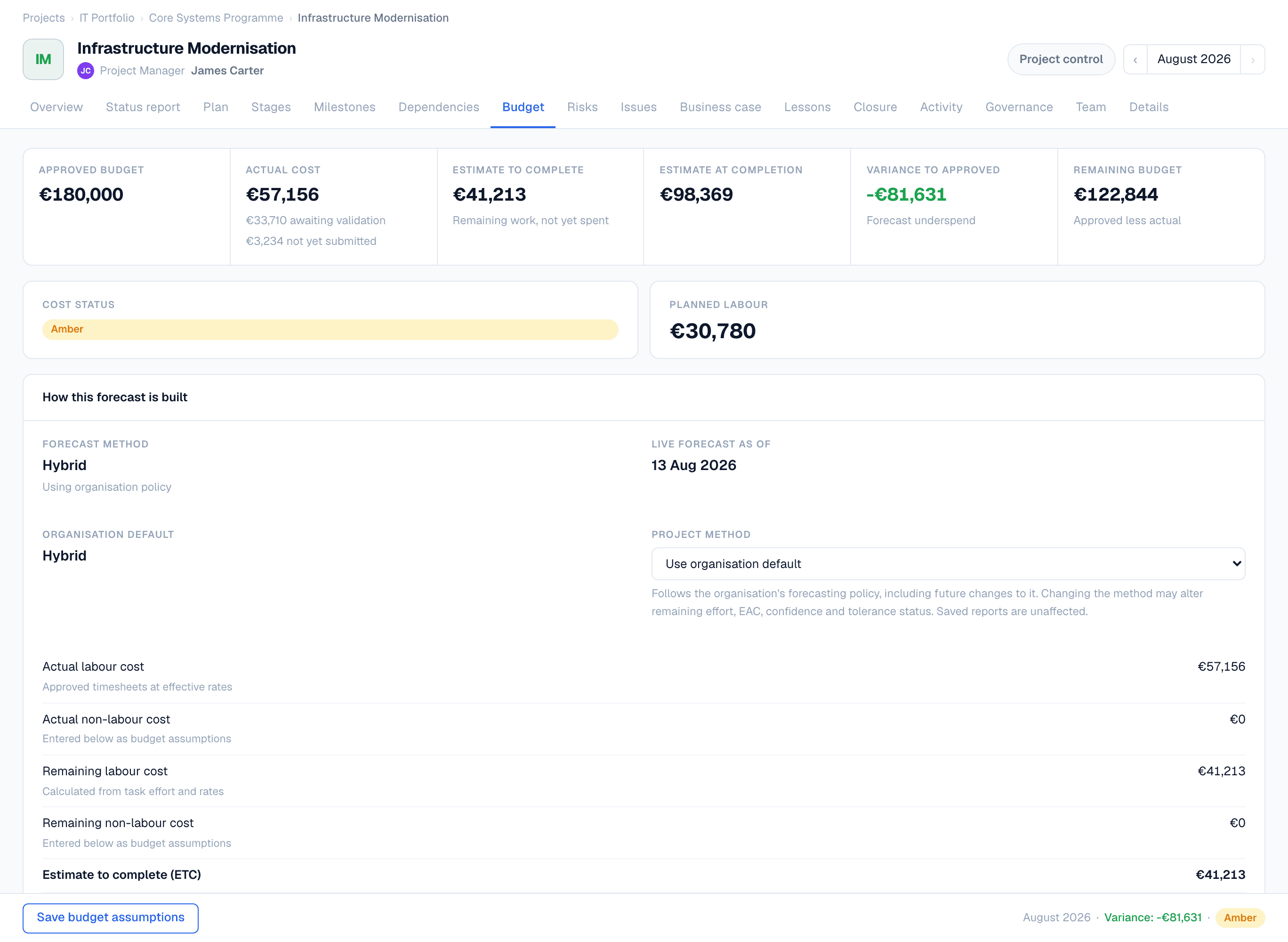
Flowr's budget page. Across the top, approved budget 180,000 euros, actual cost 57,156, estimate to complete 41,213, estimate at completion 98,369, variance to approved minus 81,631 shown in green as a forecast underspend, and remaining budget 122,844. Cost status is amber. Below, a panel titled How this forecast is built shows the method, the date it was calculated, and the actual and remaining labour and non-labour costs that add up to the estimate to complete.
Every figure with the line that produced it. Cost status is amber while the forecast is under budget — because a third of the logged time is still awaiting validation, and Flowr says so rather than reporting the flattering number.
  • Overrides on the record

    Override the model and it's stored as a decision with a reason, not a silent edit.

  • Uncosted exposure, never zero

    Work Flowr can't cost is reported as exposure rather than quietly priced at nothing.

  • Periods that actually close

    Numbers and snapshot captured at close, uneditable after. Reopening is recorded.

  • Rates that respect history

    A rate change next month doesn't rewrite what last month cost.

A closed reporting period in Flowr. The summary shows status CLOSED, financial year FY2026 Q3, three snapshots, zero exceptions, and who closed it and when. Below, three frozen project snapshots, each marked FINAL, with the estimate at completion split into actual through the period end, work performed since the period end, and what still remains.
July 2026, closed on 13 August. The line under the heading is the one worth reading: “Actuals are limited to 31 Jul 2026. Forecast values reflect the latest project position available on 13 Aug 2026 — a reporting delay of 13 days.” Most tools would let those two dates quietly become one number.

Flowr does not convert between currencies. A multi-currency portfolio is reported per currency, because a made-up exchange rate is worse than two honest numbers.

Eleven status decks, or one list.

ProjectScope · Sched · Budget · RiskForecast vs approved budget
Infrastructure ModernisationIT Portfolio+11.6%
ERP MigrationCore Systems+24.3%
Data PlatformIT Portfolio+6.1%
Customer PortalDigital-2.4%

Built from the same numbers the projects report — not a separate spreadsheet that drifts.

  • Milestones across projects

    What's late, what's next, what's critical — in one place.

  • CapacityBusiness

    Where workload is building, with approved leave and holidays already taken out.

  • Budget roll-up

    Portfolio and programme totals from live project data.

  • Business reviews

    Publish it and it's the version of record. One at a time, enforced by the database.

Flowr's cross-project milestone list. Counters read seven active, two due in thirty days, one overdue, one completed this month. The table lists each milestone with its project, portfolio, planned date, status and a Work complete bar. The overdue row, Dry run signed off, shows a hundred percent of its work complete.
Every milestone in the portfolio on one list. Read the top row: Dry run signed off is ten days overdue with 100% of the work due before it complete. The work landed and nobody signed the gate — which is the kind of thing a status deck never says.

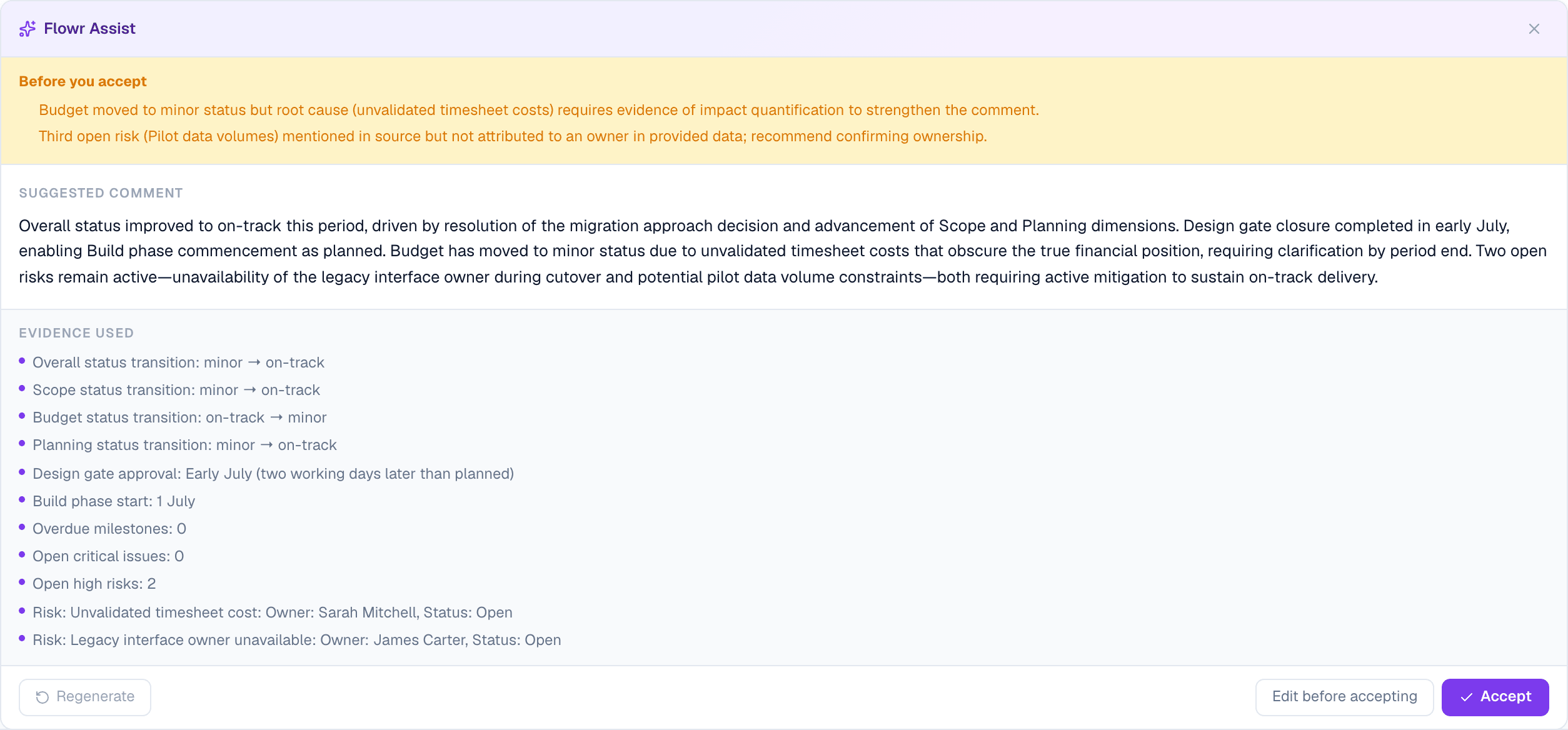
It writes the first draft. You still sign it.

Draft · not submitted

“Delivery remains broadly on plan, though effort consumed is running ahead of reported progress. Two risks were raised this period; the API vendor dependency is the material one and has no agreed mitigation date.”

Accept into reportEditDiscard

Nothing reaches a report without someone accepting it. If your governance model says no AI at all, an administrator switches it off and the endpoints refuse.

We ran it on real programmes before we sold it to anyone.

Flowr started as internal tooling for a public-sector delivery team — chasing status by email, copying RAG indicators into slides, reconciling timesheets in spreadsheets. It ran in production on real programmes before it became a product.

What we can prove

Organisation-level data separation and role-based access control. Identity events are signature-verified; removing access takes effect on the next request, always. Recovery is rehearsed, not assumed — our last test restored in 4 minutes 6 seconds.

What we don’t claim

No SOC 2. No ISO 27001. No SSO or SCIM yet — assessed and deliberately deferred. Recovery window is seven days. Status reports export to PDF, but a published business review does not.

See it against your own projects.

Early access is limited and teams are invited progressively.

Does this replace Jira or Asana?

No. Those run the work; Flowr controls the project. Most teams keep both.

Can I bring what I already have?

Projects, risks and issues import from CSV or Excel, with a preview before anything is written.

Can I get my data back out?

Status reports export to a print-ready PDF. The full organisation export is JSON, self-serve, any time. A published business review has no PDF export yet — that's on the list, and we'd rather say so.

What if I only run three projects?

Solo is €12 a month and runs one project end to end. The lifecycle is not the thing we hold back.

Where does the data live?

Azure SQL in the EU, with organisation-level separation and role-based access control.

Flowr — project controls for PMOs