Project controls for PMOs

Every project says it’s on track.Flowr tells you which ones are.

Business case, plan, budget and timesheets in one control system, so status comes from evidence rather than optimism.

From business case to portfolio.

  1. Business case
  2. Plan & baseline
  3. Delivery
  4. Financial control
  5. Reporting
  6. Portfolio

One connected journey. One source of truth.
See the full project lifecycle

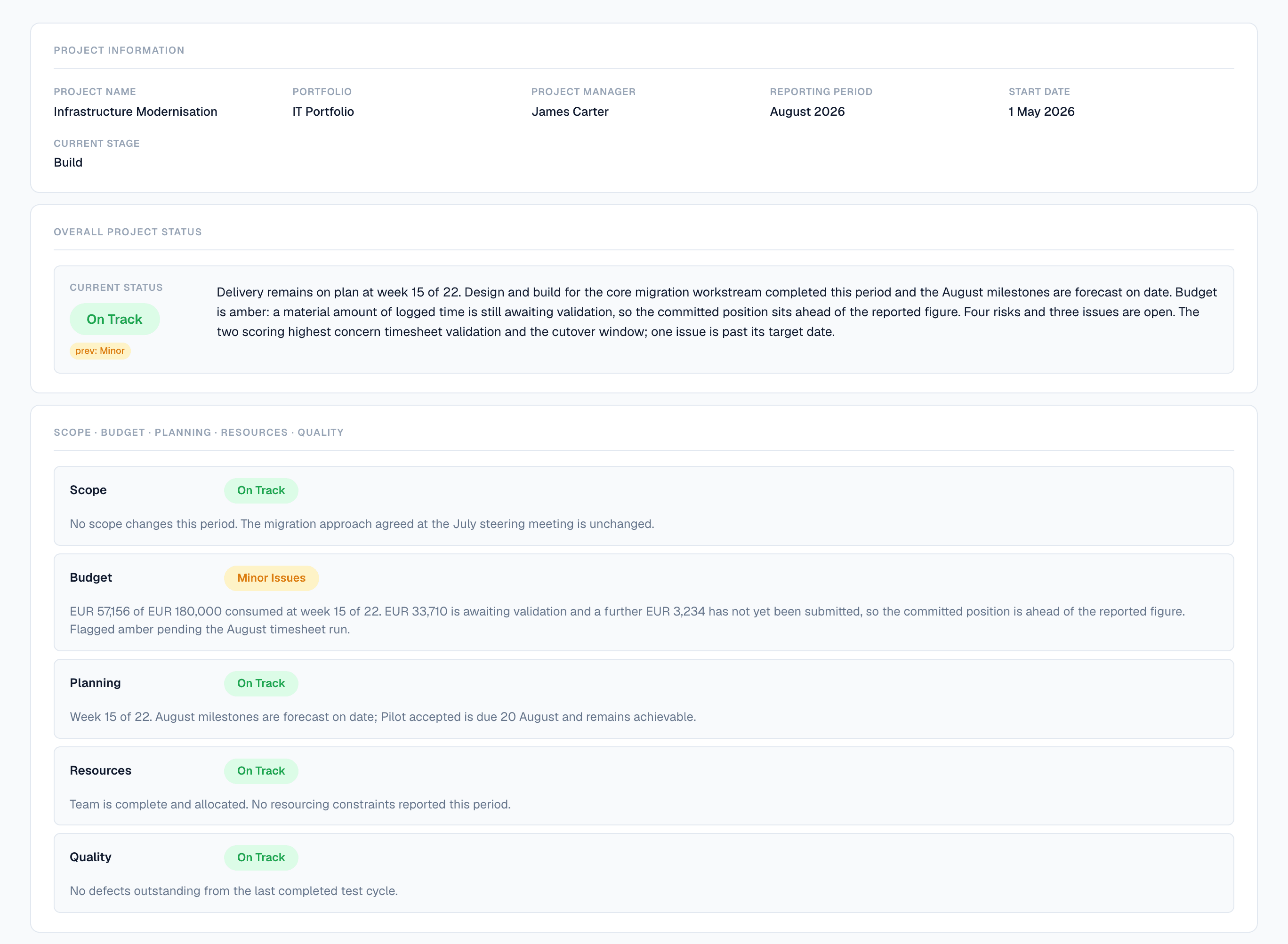
A submitted Flowr status report for Infrastructure Modernisation, August 2026. Overall status On Track, with a chip showing the previous period was Minor. The narrative states the project is at week 15 of 22 and that the forecast is 4.5 percent over the approved budget, inside the 5 percent tolerance. Separate ratings follow for Scope, Budget, Planning, Resources and Quality; Budget is amber, reporting 145,971 euros incurred of 192,000 approved and a forecast of 200,651 at completion.
The report as the project team submitted it, and the measurement underneath it.
Why Flowr

The tool it replaces is three tools and a deck.

Running a project from four places is not a decision anyone makes. You arrive there one reasonable choice at a time.

Today
  • Plan or task toolPlan
  • Budget spreadsheetBudget
  • TimesheetsTime
  • Status deckReporting
In Flowr — one screen
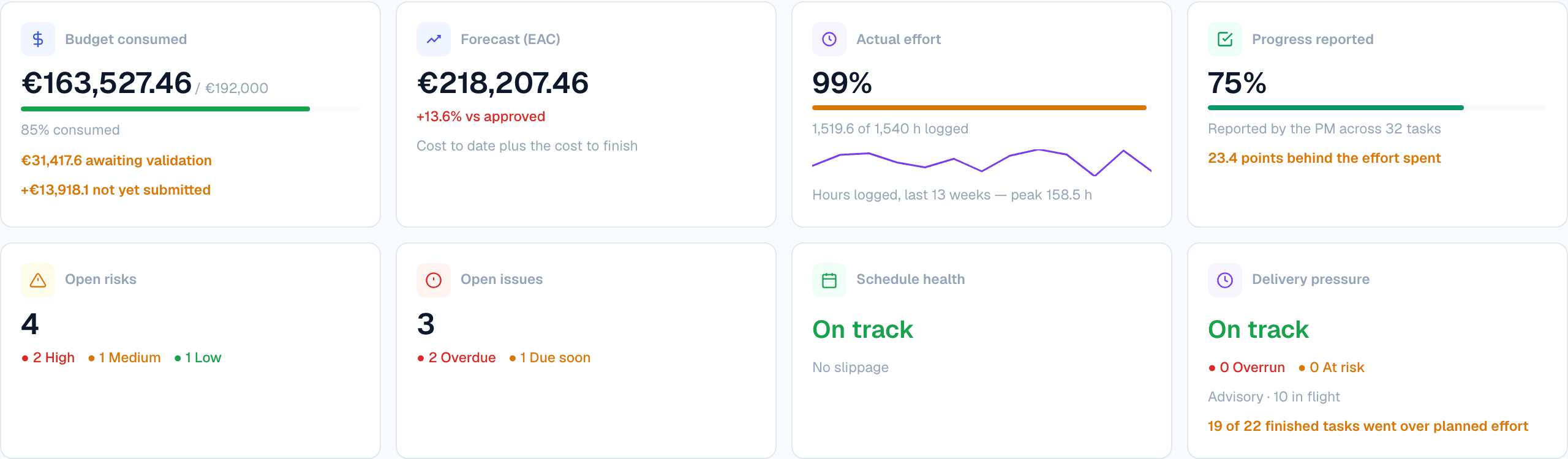
The control row of a Flowr project overview. Budget consumed reads 163,527.46 euros of 192,000 approved at 85 per cent, with 31,417.60 awaiting validation and 13,918.10 not yet submitted. Forecast at completion reads 218,207.46 euros, 13.6 per cent over approved. Actual effort reads 99 per cent, 1,519.6 of 1,540 hours logged, above a thirteen-week line of hours logged peaking at 158.5. Progress reported reads 75 per cent across 32 tasks, 23.4 points behind the effort spent. Below them: four open risks of which two are high, three open issues of which two are overdue, schedule on track with no slippage, and delivery pressure on track across ten tasks in flight, noting that 19 of 22 finished tasks went over planned effort.
The budget, the timesheets, the plan and the reporting position — one screen, one project, figures that reconcile because they are the same figures. The effort card is measured; the progress card is what the manager reported. Flowr shows both and names the gap. This screen is a different snapshot from the week-15 position shown further down the page.

What project control software has to connect

The signal

A project doesn’t go off track in one week. It goes quietly.

Flowr compares what a project reports with what its own timesheets, plan and budget say, and tells you which side of your threshold it has landed on.

How the delivery signal works
Progress reportedEffort consumed
0%25%50%75%100%wk 1wk 5wk 10wk 1530 points apart by week 1066%94%

Explore evidence & control

Governance

Evidence, with governance built in.

You set the thresholds once for the organisation, so amber means the same thing in every project. Flowr applies them and shows the evidence behind each finding.
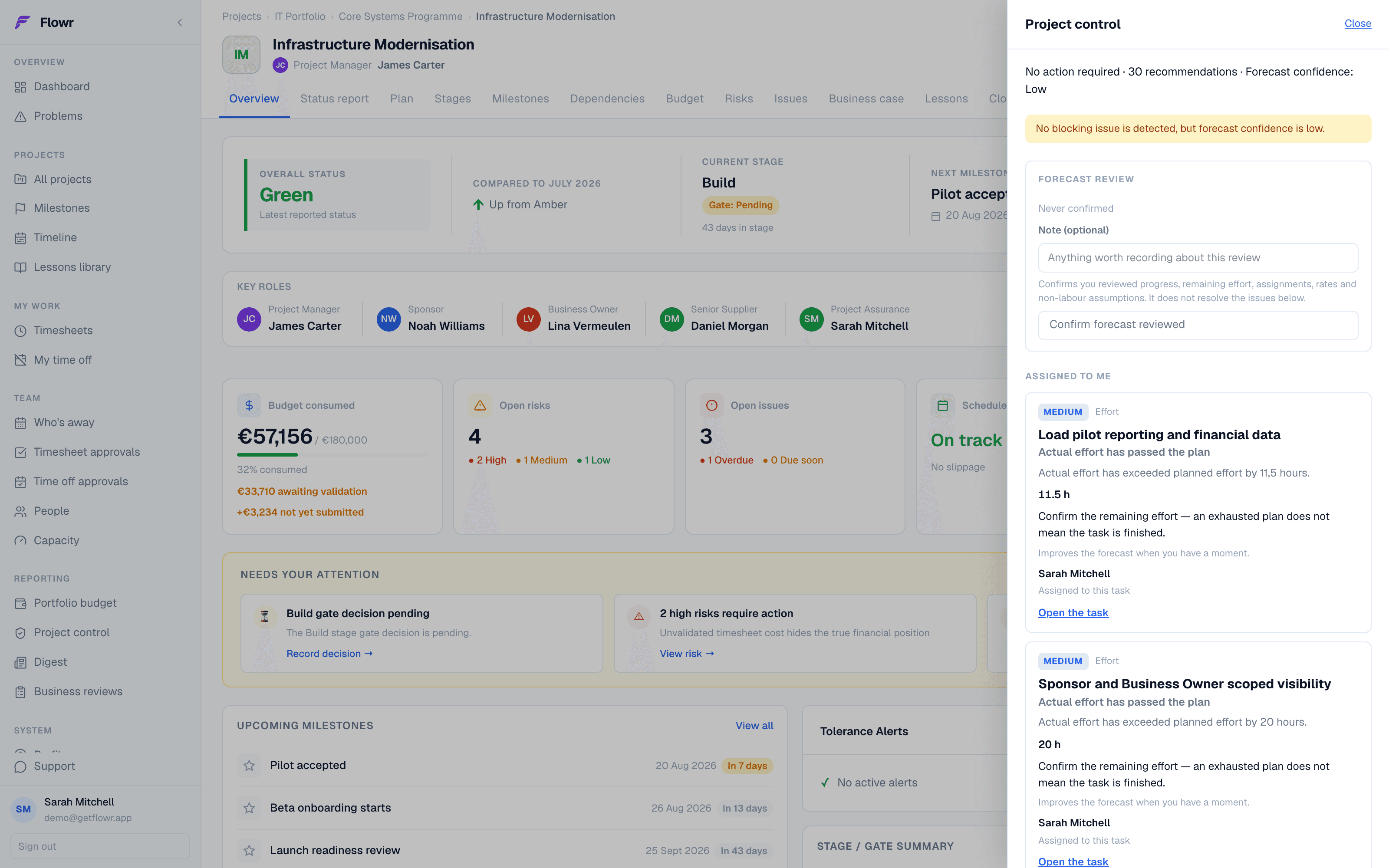
A Flowr project overview with the control drawer open. The drawer reports thirty-one recommendations and low forecast confidence, then two effort findings assigned to the reader, each naming the hours by which actual effort has passed the plan. Behind it the project shows 145,971 euros consumed of 192,000 approved, four open risks of which two are high, and three open issues.
Every finding names the task, the hours and the gap, and links to where it came from.
Outside tolerance

Thresholds are set once, for the organisation, not per project.

Effort signal

94% consumed against 66% reported, with the tasks that caused it.

Explained

Say why it is fine or fix it. Either way the answer is on the record.

Explore governance

Financial control

Financial control you can explain.

Approved budget, actual cost and forecast in one model. Every labour cost traces to submitted time, the rate in force on that date, and a period closed on a specific day.
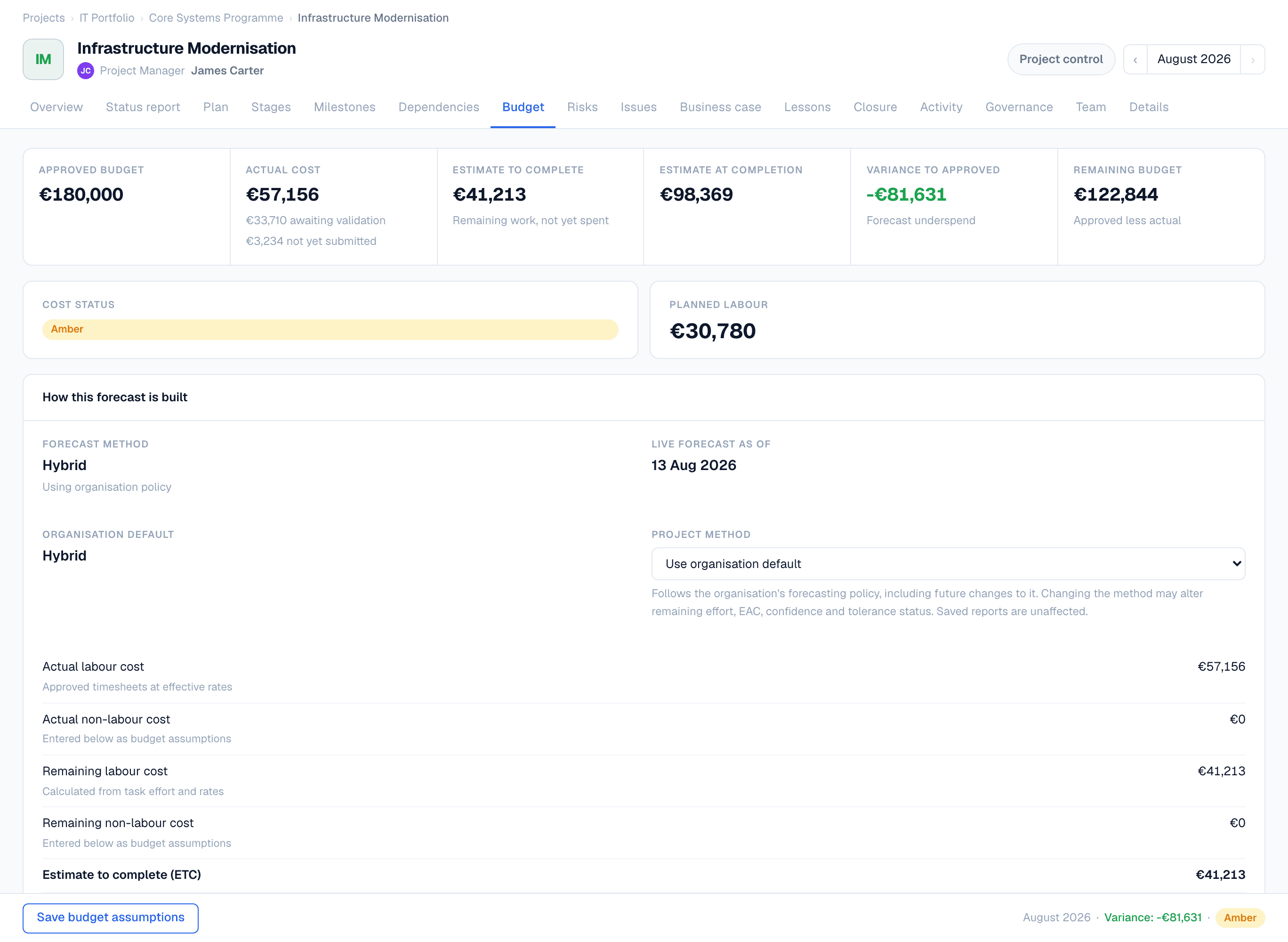
Flowr's budget page, showing the closed position as of 31 July 2026 — figures frozen at the period close. Across the top: approved budget 192,000 euros, actual cost 127,224, estimate to complete 54,680, estimate at completion 200,651, variance to approved plus 8,651 stated against an approved budget of 192,000, and variance to baseline plus 20,603 stated against Baseline 0 of 180,048.80. Budget status is green, inside the 5 percent tolerance. Below, the approved budget's change history: a 12,000 euro increase approved by the Steering Committee under reference SC-2026-07.
The forecast sits €20,603 above the baseline plan and 4.5% above the approved budget.
Two references

Over the plan and over the budget are different problems.

What changed

Flowr says why the forecast moved, not just that it did.

Explore financial control

Portfolio

One project view becomes one portfolio view.

The same evidence, rolled up. Not a second reporting process that drifts from the first.

The Projects table on Flowr's portfolio budget page. Three rows: Infrastructure Modernisation, approved 192,000 euros, forecast 200,651, variance plus 8,651 in red; Customer Portal Revamp, variance minus 109,069 in green; Billing Platform Migration, forecast completion 15 December 2026 marked plus 46 days. The last column, Last PSR, reads 2026-08 for the first project and Never for the other two.
Each row carries the figures that project reports on its own budget page.

Explore portfolio control

Flowr Assist

It writes the first draft. You still sign it.

Flowr Assist drafts a status update from the project evidence already in the system, and shows you exactly what it used.
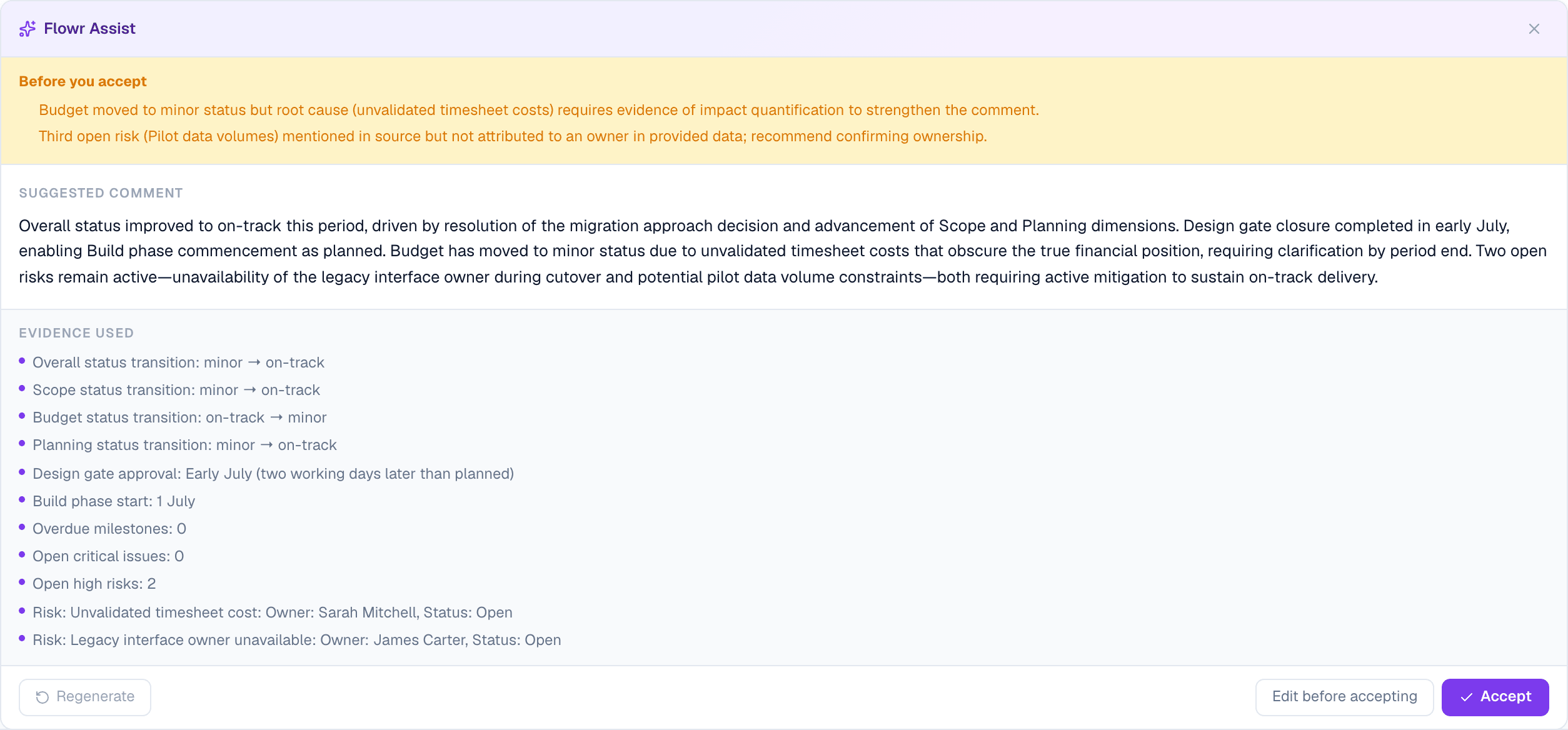
Flowr Assist drafting a status comment. An amber banner headed Before you accept raises two objections to its own draft: the budget sentence needs evidence of impact, and a third risk is named without an owner. Below it the suggested comment, then an Evidence used list of eleven items — status transitions, the design gate approval date, open risk counts, and two named risks with their owners. The footer offers Regenerate, Edit before accepting, and Accept.
Eleven facts listed under the draft, and an amber banner where Flowr objects to its own suggestion.

Explore Flowr Assist

Start

See Flowr against your own projects.

Early access is granted one workspace at a time, so we can set it up against your real projects. Your 14-day trial begins only when you move onto a plan, so evaluating Flowr never spends it.

Project Control Software for PMOs | Flowr